
 06/05/2020
Chào các bạn, như ở bài "Hướng dẫn cài đặt facebook live chat cho website" iTOOL đã hướng dẫn các bạn tích hợp tính năng chat trực tiếp với fanpage facebook thông qua website. Tuy nhiên ở phiên bản trước có 1 điều bất tiện là khi truy cập trên điện thoại hoặc các thiết bị di động thì phần facebook live chat này che mất màn hình gây khó chịu cho người sử dụng.
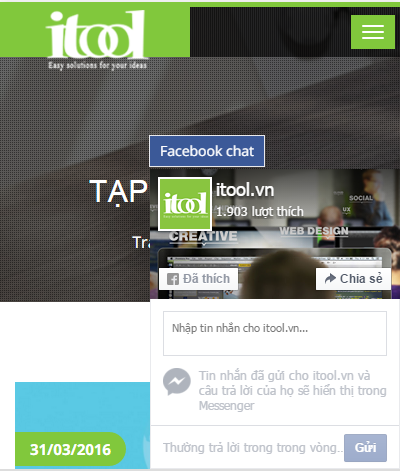
Facebook live chat luôn hiển thị trên mobile
(function ($) { $(document).ready(function () { $('#itool-minimize').click(function () { if ($('#itool-facebook').css('opacity') == 0) { $('#itool-facebook').css('opacity', 1); $('.itool-messages').animate({ right: '0' }).animate({ bottom: '0' }); } else { $('.itool-messages').animate({ bottom: '-300px' }).animate({ right: '-135px' }, 400, function () { $('#itool-facebook').css('opacity', 0) }); } }) }); })(jQuery);
(function (d, s, id) {
var js, fjs = d.getElementsByTagName(s)[0];
if (d.getElementById(id)) return;
js = d.createElement(s); js.id = id;
js.src = "//connect.facebook.net/en_US/sdk.js#xfbml=1&version=v2.5&appId=260033340819904";
fjs.parentNode.insertBefore(js, fjs);
}(document, 'script', 'facebook-jssdk'));
</script>
<div class="itool-messages">
<div class="itool-messages-outer">
<div id="itool-minimize">Facebook chat</div>
<div id="itool-facebook" class='fb-page' data-adapt-container-width='true' data-height='300' data-hide-cover='false' data-href='https://www.facebook.com/itool.vn' data-show-facepile='true' data-show-posts='false' data-small-header='false' data-tabs='messages' data-width='250'></div>
</div>
</div>
OK vậy là xong rồi các bạn truy cập web bằng điện thoại để tận hưởng thành quả nhé! Chúc các bạn thành công.
Facebook live chat luôn hiển thị trên mobile
Để khắc phục vấn đề trên hôm nay iTOOL sẽ hướng dẫn các bạn cập nhật lại version mới facebook live chat sẽ hiển thị responsive trên các thiết bị di động và tất nhiên là sẽ không còn gây phiền phức khó chịu cho khác hàng nữa. Thật là tuyệt phải không nào!
Bắt đầu làm thôi, các bước cài đặt các bạn có thể xem lại ở bài "Hướng dẫn cài đặt facebook live chat cho website" nhé. ở bước 2 bạn chỉ cần cập nhật lại đoạn code sau:
Bắt đầu làm thôi, các bước cài đặt các bạn có thể xem lại ở bài "Hướng dẫn cài đặt facebook live chat cho website" nhé. ở bước 2 bạn chỉ cần cập nhật lại đoạn code sau:
<style type="text/css">
.itool-messages { position: fixed; bottom: 0; right: 0; z-index: 999999; }
.itool-messages-outer { position: relative; }
#itool-minimize { background: #3b5998; font-size: 14px; color: #fff; padding: 3px 10px; position: absolute; top: -34px; left: -1px; border: 1px solid #E9EAED; cursor: pointer; }
@media screen and (max-width:768px){ #itool-facebook { opacity:0; } .itool-messages { bottom: -300px; right: -135px; } }
</style>
<script>(function ($) { $(document).ready(function () { $('#itool-minimize').click(function () { if ($('#itool-facebook').css('opacity') == 0) { $('#itool-facebook').css('opacity', 1); $('.itool-messages').animate({ right: '0' }).animate({ bottom: '0' }); } else { $('.itool-messages').animate({ bottom: '-300px' }).animate({ right: '-135px' }, 400, function () { $('#itool-facebook').css('opacity', 0) }); } }) }); })(jQuery);
(function (d, s, id) {
var js, fjs = d.getElementsByTagName(s)[0];
if (d.getElementById(id)) return;
js = d.createElement(s); js.id = id;
js.src = "//connect.facebook.net/en_US/sdk.js#xfbml=1&version=v2.5&appId=260033340819904";
fjs.parentNode.insertBefore(js, fjs);
}(document, 'script', 'facebook-jssdk'));
</script>
<div class="itool-messages">
<div class="itool-messages-outer">
<div id="itool-minimize">Facebook chat</div>
<div id="itool-facebook" class='fb-page' data-adapt-container-width='true' data-height='300' data-hide-cover='false' data-href='https://www.facebook.com/itool.vn' data-show-facepile='true' data-show-posts='false' data-small-header='false' data-tabs='messages' data-width='250'></div>
</div>
</div>
OK vậy là xong rồi các bạn truy cập web bằng điện thoại để tận hưởng thành quả nhé! Chúc các bạn thành công.